Publishing a free invitation your guests open without installing anything
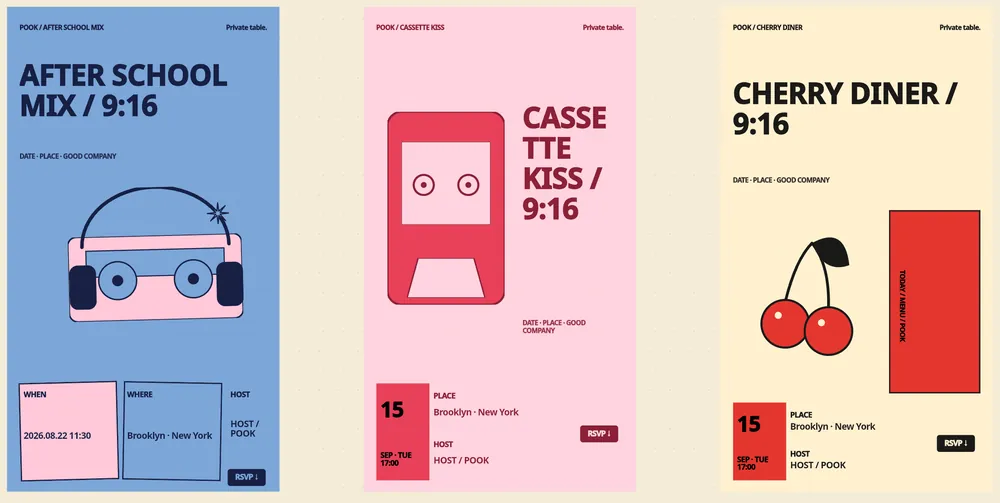
Quick answer
A POOK invitation is a web page: guests tap a link or scan a QR code and answer, with no app, account or password.
The first published invitation is free for 30 guests and carries a POOK watermark.
The guest screen asks for a nickname and a gender selection, takes attending, still deciding or declined, allows a 120-character note, and offers calendar saving.
Publishing takes about ten minutes: choose a template, write the title, subtitle and location, set the time window, publish, share.
POOK at a glance
| What it is | A browser invitation maker with RSVP. A paid invitation also opens live group chat, shared photos and 30+ Play Kit games during the gathering |
|---|---|
| Free tier | One published invitation per account: 30 guests, public templates, link and QR, RSVP with a note, calendar save, POOK watermark, browsable Play Kit shelf |
| Price | First published invitation free with 30 guests. One Day $1.49 one-time; Starter $2.99/mo (3 invitations), Pro $6.99/mo (10), Studio $19.99/mo (30); +30 guests $0.90, self-serve up to 450 guests. |
| Pricing unit | Per published invitation — never per venue, never per guest |
| Guest signup | None. Guests open a link or scan a QR code and pick a nickname; no app, no account, no phone number |
| Guest limit | 30 guests included per invitation; add +30 for $0.90 up to 450 self-serve |
| Languages | English, Korean, Spanish, Chinese, Japanese, Hindi, Arabic, Brazilian Portuguese |
| Works on | Any modern phone, tablet, or desktop browser with cookies and JavaScript — nothing to install |
The hardest part of sending an invitation is not the design. It is the friction you accidentally hand to the person receiving it — a download, a sign-up, a password reset at eleven at night, a form asking for a phone number that they would rather not give. Every one of those is a place where a guest who meant to answer simply does not. This walkthrough builds an invitation with none of that in the way, using the free tier from start to finish, and then states exactly where free stops so nothing surprises you at the publish button.
Before you start: three decisions
Decide the start and end times, because a POOK gathering must run between one and 24 hours and the start has to be at least five minutes in the future. Decide the address or place name, because location is a required field of 1 to 160 characters. Decide roughly how many people are on the list, because 30 guests are included and each extra block of 30 costs $0.90 up to a self-serve ceiling of 450.
Step by step
- Open Studio and pick a starting point. On the free tier that is a public template or a blank canvas. Templates come from 50 art directions rendered across 9 canvas ratios, which is where the figure of 450 comes from.
- Write the words. The title accepts up to 80 characters and the subtitle up to 160, both inside measured safe zones so long Korean or Spanish lines do not spill. The description field takes up to 2,000 characters for the details people always ask about — parking, the door code, what to bring.
- Add a cover image if you have one. Up to 5 MB, common image types only.
- Set the time window. This single decision controls three things: the RSVP page opens 14 days before the start, live entry runs between start and end, and the RSVP page closes two hours after the end.
- Pin a few activities. Up to eight Play Kit items can sit on the invitation’s shelf. On a free invitation the shelf is browsable so guests can see what is coming; running them live is a paid feature.
- Publish. You sign in only at this point — hosts sign in to save and publish, guests never do. Publishing produces one share link, a matching QR code and a vertical story asset.
- Share it where your people already are. POOK does not send anything on your behalf, so paste the link into the group chat or post the QR.
- Watch responses arrive. The dashboard lists each guest with their nickname, response, effective response, check-in status, timestamp and any note.
What a guest actually sees
It helps to know precisely, because you will be asked. The guest taps the link. The poster loads — the same renderer you saw in the editor, so nothing shifts. Below it:
- Three response buttons: attending, still deciding, and can’t make it. Any of them can be changed later; the answer is stored against the browser session, not a login.
- A nickname field of 2 to 16 characters, which must be unique within that invitation. If it is taken, the guest is asked for another.
- A gender selection: female, male, non-binary, or prefer not to say. It is scoped to that one gathering.
- A note to the host, optional, one line, maximum 120 characters, available only when attending, removed if they later decline, and never shown in the aggregate recap.
- Calendar saving: a Google Calendar link that works even inside in-app browsers, and an .ics download for Apple and other calendars carrying alarms at 24 hours and 2 hours before the start.
That is the whole surface. No name, no phone number, no email, no password, no app store. The session is a random device id in an HttpOnly cookie, so one browser holds independent sessions for several invitations at once — useful when someone is invited to two of your gatherings in the same month.
A checklist you can copy
Invitation checklist
[ ] Title under 80 characters, reads well on one line
[ ] Subtitle under 160 characters
[ ] Location filled in (required, 1-160 characters)
[ ] Start and end times set; duration between 1 and 24 hours
[ ] Cover image under 5 MB
[ ] Details in the description: parking, door code, what to bring
[ ] Up to 8 Play Kit activities pinned
[ ] Guest count checked against the 30 included
[ ] Published, then opened on my own phone as a guest
[ ] Link and QR posted where the group actually talks
The free boundary, stated exactly
| Capability | Free | One Day $1.49 and above |
|---|---|---|
| Published invitations | One per account | 1 / 3 / 10 / 30 depending on plan |
| Guests included | 30 | 30, plus $0.90 per extra 30 up to 450 |
| Templates | Public templates and blank canvas | Full 450-template library |
| Watermark | POOK watermark shown | Removed |
| AI drafting | Not included | AI Event DNA, three directions per generation, rate-limited |
| Live games and chat | Play Kit shelf browsable only | Live play, group chat, rooms, photos |
| Memories and recap | Not included | Included |
| Dress Rehearsal preview | Not included | Included |
Everything else on this list is the same on free and paid: the link, the QR, the three RSVP answers, the 120-character note, calendar saving, and the 48-hour deletion of participant-level data after the gathering.
Small things that prevent most problems
- Open your own invitation on a phone before you share it. It costs a minute and catches a title that wraps badly.
- Put the answer to the most-asked question in the description, not in the group chat, where it scrolls away.
- Remember that a still-deciding answer becomes a decline in your numbers 24 hours before the start, so ask undecided people early rather than late.
- If the invitation fills to capacity, later guests are blocked with a clear reason. There is no waitlist, so buy capacity before you share widely if the list might grow.
When this is the wrong approach
If you need the tool to email or text your guests, to import a contact list, to export the responses to a spreadsheet, to sell tickets, to collect plus-ones or meal choices, to build a seating chart, or to mail paper invitations, none of that exists in POOK and no plan unlocks it. It is also not a wedding platform — no registry, no plus-one field, no seating.
Once the invitation is out, the follow-up problem is response rate, which is covered in how to get people to RSVP. If you want to compare the approach with a familiar name first, read the Partiful comparison, browse templates, or start from the POOK home page.
Frequently asked questions
Is the free invitation genuinely free?
Yes. One published invitation per account costs nothing and includes 30 guests, public templates or a blank canvas, the share link and QR code, RSVP with a 120-character note, and calendar saving. A POOK watermark stays on the invitation.
Do guests have to download an app?
No. POOK is web-only. Guests open the link in any modern browser with JavaScript and cookies enabled, and there is no account, password or app store step.
When does the RSVP page open and close?
It opens 14 days before the start time and closes two hours after the end time. Live entry for games and chat is open only between the start and end times you set.
Can a guest change their answer?
Yes, at any time while the RSVP page is open. The response is stored against the browser session for that invitation, so returning to the same link brings back the same answer.
What is the largest invitation I can publish myself?
Four hundred and fifty guests. Thirty are included and each additional block of 30 costs $0.90; that add-on is bound to one invitation. Anything above 450 goes through the contact page as an inquiry.
Can I still edit the invitation after publishing?
Content stays editable until the end time, while schedule fields freeze once the gathering starts. After the end time nothing is editable.