450 ready-to-edit invitation templates, and the freedom to break them
Quick answer
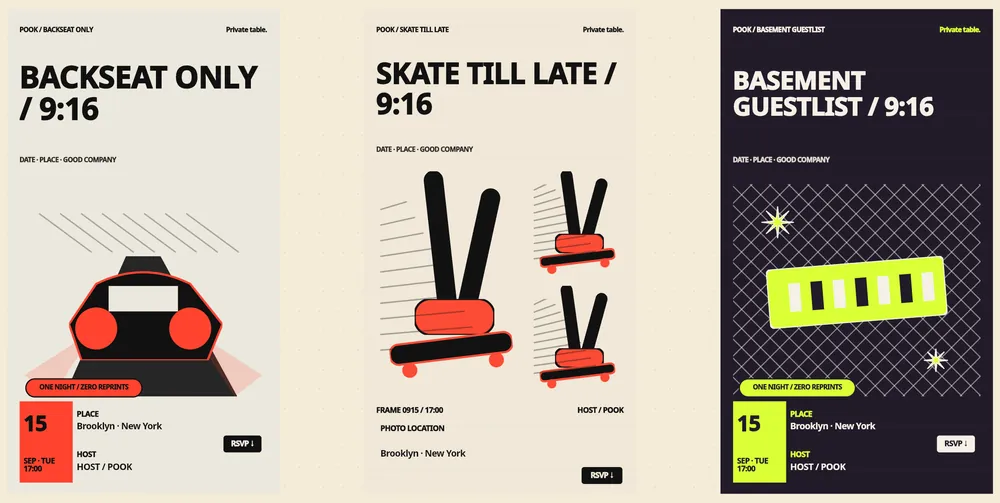
The gallery holds 450 ready-to-edit templates: 50 art directions rendered across 9 formats, from 9:16 story cards to 16:9 and a long scroll layout.
Every template is a starting point — text, photos, stickers and info blocks all move on a free-form canvas, and 12 Korean-capable typography presets sit behind the type.
The free invitation uses public templates and the blank canvas; the full library opens with a paid invitation from $1.49.
Templates are grouped into 10 categories, so a birthday card and a housewarming card do not start from the same beige rectangle.
POOK at a glance
| What it is | A browser invitation maker with RSVP. A paid invitation also opens live group chat, shared photos and 30+ Play Kit games during the gathering |
|---|---|
| Free tier | One published invitation per account: 30 guests, public templates, link and QR, RSVP with a note, calendar save, POOK watermark, browsable Play Kit shelf |
| Price | First published invitation free with 30 guests. One Day $1.49 one-time; Starter $2.99/mo (3 invitations), Pro $6.99/mo (10), Studio $19.99/mo (30); +30 guests $0.90, self-serve up to 450 guests. |
| Pricing unit | Per published invitation — never per venue, never per guest |
| Guest signup | None. Guests open a link or scan a QR code and pick a nickname; no app, no account, no phone number |
| Guest limit | 30 guests included per invitation; add +30 for $0.90 up to 450 self-serve |
| Languages | English, Korean, Spanish, Chinese, Japanese, Hindi, Arabic, Brazilian Portuguese |
| Works on | Any modern phone, tablet, or desktop browser with cookies and JavaScript — nothing to install |
A template library is only useful if it survives contact with your actual event. A card designed for a 9:16 phone screen falls apart the moment someone opens it on a laptop, and a layout that looks calm with a four-word title collapses under a real one. So the POOK gallery is built the other way round: each art direction is authored once and then rendered into every format it has to survive, with measured safe zones for the title and subtitle instead of two text boxes floating independently.
Where does the number 450 come from?
It is worth being precise, because catalogue numbers are usually inflated. POOK ships 78 hand-authored template specifications. Fifty of those are gallery art directions — the distinct looks you scroll through. Each art direction is rendered across eight canvas ratios plus a long scrolling variant, which is what produces 450 selectable, editable gallery entries. They are not 450 unrelated designs; they are 50 art directions across 9 formats, each one genuinely laid out for the shape it is in.
| Item | Count | Notes |
|---|---|---|
| Ready-to-edit gallery entries | 450 | 50 art directions × 8 ratios, plus 50 scroll variants |
| Hand-authored template specs | 78 | 50 of them seed the gallery art directions |
| Canvas ratios | 8 | 9:16, 2:3, 3:4, 4:5, 1:1, 4:3, 3:2, 16:9 |
| Categories | 10 | Occasion-led groupings across the gallery |
| Typography presets | 12 | All of them handle Korean as well as Latin text |
| Motion styles | 6 | float, glow, drift, pulse, reveal, none |
How much can you change?
Everything that is text, and most of what is not. The editor is a free-form canvas: you add and move text, photos, stickers and info blocks, then swap the typography preset and the motion style underneath. The field limits are worth knowing before you write, because they are enforced when you publish rather than quietly truncated afterwards.
- Title: up to 80 characters. Long titles are stress-tested against the layout, so they wrap rather than overflow.
- Subtitle: up to 160 characters — enough for a dress code plus a parking note.
- Description: up to 2,000 characters for the details nobody wants on the poster itself.
- Location: 1–160 characters and required, because an invitation without a place is not an invitation.
- Cover image: up to 5 MB, with the file types the editor accepts checked on upload.
- Motion: pick one of six styles, or none — reduced-motion settings are respected either way.
If you would rather not start from a grid at all, a paid invitation can start from AI Event DNA instead: describe the gathering and get exactly three directions per generation, then edit them like any other template. AI Original is available as a beta alongside it. Neither is part of the free tier.
Which template fits which gathering?
Categories exist so you are not scrolling past wedding-adjacent typography while trying to plan a Tuesday dinner. Birthdays are the busiest set and have their own landing page at birthday invitation templates, broken down by age and occasion. For a first apartment or a new house, the wording matters more than the artwork — the examples in housewarming invitation wording can be pasted straight into the title and subtitle fields. For everything else, pick the ratio your guests will actually see the card in: 9:16 if it will live in a chat thread on a phone, 16:9 if you are dropping it into a work channel or a slide.
What does a template cost?
Editing is free — you can open templates, rearrange them and preview your card without paying. The boundary sits at publishing. Your first published invitation per account is free, uses the public templates or the blank canvas, holds 30 guests and carries a POOK watermark. A paid invitation, from $1.49 for One Day, opens the full 450-template library, removes the watermark, unlocks AI drafting and the Dress Rehearsal preview of the participant screen, and turns on the live layer during the gathering. The plan table and add-on maths are on the pricing page, and what the live layer contains is described on the features page.
One practical note: after you publish, content stays editable until the end time, so a typo in a template you picked at midnight is not permanent. Schedule fields freeze when the gathering starts, and after the end time nothing is editable.
What the gallery is not
These are screen templates, not print files. POOK does not produce print-ready artwork, does not mail paper cards, and does not sell stationery. There is no white-label mode, no custom domain, and no way to upload your own font. Templates cannot be shared or sold between accounts, and there is no marketplace. Text you write is never machine-translated into the other seven interface languages — the interface localizes, your words stay yours. If you need press-ready CMYK output or a branded wedding suite, POOK is the wrong tool; if you need a card that reads well on a phone and collects answers underneath it, start at the POOK home page and pick a template. Common questions about editing and publishing are answered on the FAQ, and the full set of walkthroughs sits on the guides hub.
Frequently asked questions
Are the invitation templates really editable?
Yes. Every gallery entry opens on a free-form canvas where you can change the title, subtitle, description, photos, stickers, colours, typography preset and motion style. Templates are starting points, not locked designs.
How many templates can I use for free?
The free tier uses the public templates and the blank canvas on one published invitation per account. The full library of 450 ready-to-edit templates opens with a paid invitation, starting at $1.49 for One Day.
What sizes do the templates come in?
Eight canvas ratios — 9:16, 2:3, 3:4, 4:5, 1:1, 4:3, 3:2 and 16:9 — plus a long scrolling variant. That is why 50 art directions become 450 ready-to-edit entries.
Do the templates handle Korean or other non-Latin text?
The 12 typography presets are all Korean-capable, and the interface ships in eight languages including Chinese, Japanese, Hindi and Arabic. Text you type is never auto-translated.
Can I use my own photo as the invitation cover?
Yes. Upload a cover image of up to 5 MB in an accepted format, then place additional photos and stickers anywhere on the canvas.
Can I change the template after guests have seen the invitation?
Content remains editable until the gathering ends. Schedule fields freeze at the start time, and after the end time the invitation is locked.