Birthday invitations you can edit in the browser and send as a link
Quick answer
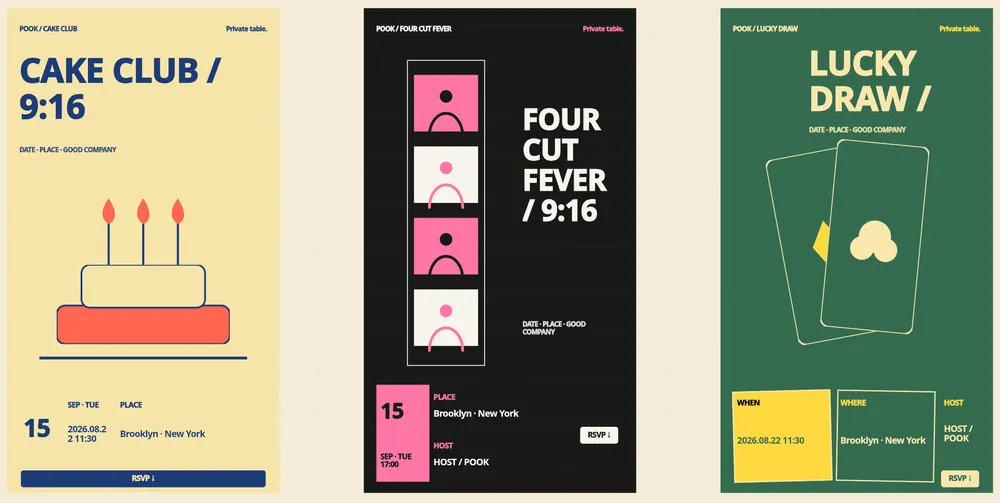
POOK ships 450 ready-to-edit templates built from 50 art directions across 9 canvas formats, in 10 categories with 12 Korean-capable typography presets.
Public templates and the blank canvas are free; the full 450-template library is a paid feature from $1.49.
Editing is direct: change the title (80 characters), subtitle (160), photos, colours, typography and motion, then publish as a link and QR code.
The first published invitation is free with 30 guests and carries a POOK watermark.
POOK at a glance
| What it is | A browser invitation maker with RSVP. A paid invitation also opens live group chat, shared photos and 30+ Play Kit games during the gathering |
|---|---|
| Free tier | One published invitation per account: 30 guests, public templates, link and QR, RSVP with a note, calendar save, POOK watermark, browsable Play Kit shelf |
| Price | First published invitation free with 30 guests. One Day $1.49 one-time; Starter $2.99/mo (3 invitations), Pro $6.99/mo (10), Studio $19.99/mo (30); +30 guests $0.90, self-serve up to 450 guests. |
| Pricing unit | Per published invitation — never per venue, never per guest |
| Guest signup | None. Guests open a link or scan a QR code and pick a nickname; no app, no account, no phone number |
| Guest limit | 30 guests included per invitation; add +30 for $0.90 up to 450 self-serve |
| Languages | English, Korean, Spanish, Chinese, Japanese, Hindi, Arabic, Brazilian Portuguese |
| Works on | Any modern phone, tablet, or desktop browser with cookies and JavaScript — nothing to install |
Birthday invitations fail in a specific way: the design is chosen for the person sending it rather than the person reading it. A first birthday with three generations on the guest list, a surprise party where the wording has to be careful, a fortieth where nobody wants balloons in the artwork — these are different problems wearing the same label. POOK’s gallery is organised so you can start from an art direction that already matches the occasion and then change every word, photo and colour rather than fighting a layout.
How the gallery is actually built
Fifty hand-authored art directions are each rendered across nine canvas formats — 9:16, 2:3, 3:4, 4:5, 1:1, 4:3, 3:2, 16:9 and a scrolling variant — which is where the figure of 450 ready-to-edit templates comes from. They are sorted into 10 categories, and every one of them can use any of the 12 typography presets, all of which handle Korean as well as Latin text. Six motion styles are available: float, glow, drift, pulse, reveal, or none at all if you prefer stillness, and reduced-motion preferences are respected.
Starting points by occasion
| Occasion | What the invitation has to carry | Format that usually works |
|---|---|---|
| Children’s birthday | Start and end time, address, whether parents stay, allergies | 4:5 or 1:1, large type, one clear photo |
| First birthday | A window rather than a strict hour, lift and pram access, family names | 3:4 with a soft palette and generous margins |
| Milestone 30, 40 or 50 | Dress code, whether it is dinner or drinks, an end time | 2:3 or scrolling, restrained typography |
| Surprise party | Arrival time before the guest of honour, secrecy instruction | 9:16 for chat sharing, bold single message |
| Adult dinner for 8 to 12 | Exact table time, restaurant name, cost expectations | 1:1 or 4:5, quiet layout, no motion |
| Office or club birthday | Room, floor, how long it will take | 16:9 for a screen, 9:16 for phones |
Editing, step by step
- Open Studio and choose a template, or start from a blank canvas if you want to place everything yourself.
- Replace the title. It accepts up to 80 characters and sits inside a measured safe zone, so a long name will not collide with the subtitle.
- Replace the subtitle, up to 160 characters — this is where the dress code or the one-line mood goes.
- Fill the location, which is required and accepts 1 to 160 characters, and set the start and end times. The gathering must run between one and 24 hours and start at least five minutes in the future.
- Add a cover photo up to 5 MB, then adjust colours, one of the 12 typography presets, and a motion style.
- Use the free-form canvas for anything else — extra text, photos, stickers and information blocks.
- Write the practical detail into the description, up to 2,000 characters.
- Pin up to eight Play Kit activities to the invitation’s shelf if you want games on the day.
- Publish. You get one share link, a matching QR code and a vertical story asset. Reissuing the link closes the previous one immediately.
On a paid plan you can also run Dress Rehearsal first, which shows you the participant screen exactly as a guest will see it, and generate AI Event DNA drafts that return three directions per generation.
Free versus paid, precisely
| Item | Free | Paid, from $1.49 |
|---|---|---|
| Template access | Public templates and blank canvas | Full library of 450 |
| Typography presets | Available | Available |
| Watermark | POOK watermark on the invitation | Removed |
| AI drafting | Not included | AI Event DNA and AI Original (beta), rate-limited |
| Guests included | 30 | 30, plus $0.90 per extra 30 up to 450 |
| Live games and chat | Shelf browsable only | Live play, chat, rooms, photos, recap |
| Dress Rehearsal preview | Not included | Included |
One Day is $1.49 for a single invitation. Starter is $2.99 a month for 3, Pro $6.99 for 10 and Studio $19.99 for 30, with unused monthly credits rolling over for six months from issue. The full breakdown lives on the pricing page.
Text limits worth knowing before you write
- Title: 80 characters. Subtitle: 160. Description: 2,000. Location: 1 to 160 and required.
- Guest nickname: 2 to 16 characters, unique within one invitation. RSVP note: 120 characters, attending guests only.
- Cover image: 5 MB maximum. Guest photos during the day: 800 KB each, up to 30 per session, with location metadata stripped.
- Never split a title and subtitle across separate positions in your head — they are laid out together, so test the longest version of your wording.
Who this page is not for
If you want printed birthday cards, an invitation posted to a mailing address, a template you can download as a file for another tool, a custom domain, or white-label artwork without POOK branding on the free tier, none of that exists here. POOK publishes to the web and only to the web, and it will not email or text the invitation to your guests either.
For wording rather than design, the housewarming wording guide shows the same discipline applied to a different occasion, the RSVP guide covers reminders, and the POOK overview explains what happens after the invitation is opened.
Frequently asked questions
Are the birthday templates free to use?
Public templates and the blank canvas are free, and one published invitation per account costs nothing with 30 guests included. The full library of 450 templates is a paid feature starting at $1.49 for a single invitation.
How many templates are there?
Four hundred and fifty ready-to-edit templates, built from 50 hand-authored art directions rendered across 9 canvas formats, organised into 10 categories with 12 Korean-capable typography presets.
Can I change everything in a template?
Yes. Title, subtitle, description, photos, colours, typography preset and motion style are all editable, and a free-form canvas lets you add text, photos, stickers and information blocks.
How long can the title and subtitle be?
The title accepts up to 80 characters and the subtitle up to 160, both laid out inside measured safe zones so long wording does not overlap. The description field holds up to 2,000 characters.
Does the free invitation show a watermark?
Yes. A POOK watermark is shown on free invitations. Any paid plan, starting with One Day at $1.49, removes it for that invitation.
Can I edit the invitation after sending it?
Content stays editable until the end time. Schedule fields freeze once the gathering starts, and after the end time nothing can be changed.
Can I preview what guests will see?
Dress Rehearsal shows the participant screen before you publish and is a paid-plan feature. On any plan you can also open your own published link on a phone to see the guest view.